Impressions
How often a module was shown to a shopper.

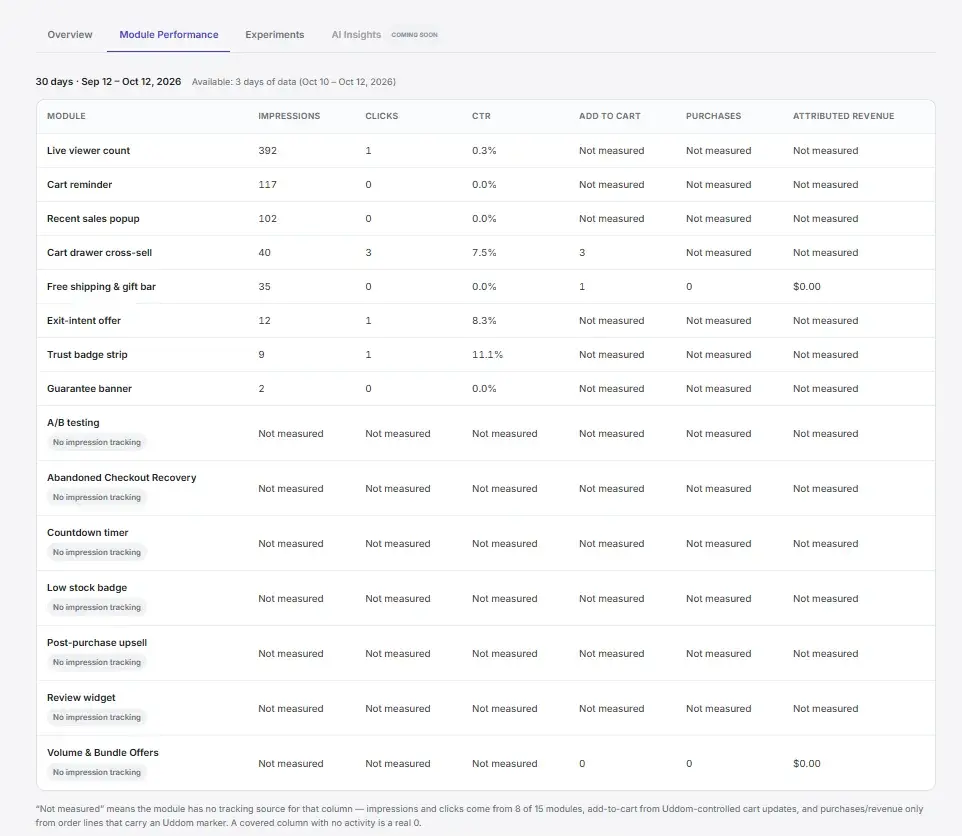
Uddom records what every module did on your storefront and reports it per module. Where there is not enough data to be honest, it says so instead of showing a zero.
Each metric is measured on the storefront and attributed back to the module that produced it. Nothing is inferred from Shopify reports.
How often a module was shown to a shopper.
How often a shopper interacted with a module.
Add-to-cart events attributed to the module.
Clicks divided by impressions.
Orders attributed to a module.
Purchases measured against impressions, with coverage disclosed.
Order value attributed to a module, reported net of refunds and cancellations.
A metric with too little data is not a zero — Uddom reports the coverage alongside the number so a small sample is never read as a real result.
Revenue attributed to a module is reported after refunds and cancellations, so it reflects money you kept.
When a module has not accumulated enough traffic, the column reads “Not measured” rather than a misleading 0%.
Insights is a reporting surface built on top of the stored analytics: choose a period and read what happened.
The headline numbers for the whole store over the period you pick.
A per-module table of what each module did, in the same period.
How each A/B test's variants performed, reported side by side.
Plain-language summaries written from your own stored numbers.
More on the reporting views in the user documentation.
Analytics only has something to report once a module is running on your storefront. Start with a free module and watch the numbers come in.