Launch
Switch on a module and configure it in the app.

Uddom is built to be understandable on day one. Install it, enable the app embed once, and configure everything from the dashboard — no code.
Add Uddom to your Shopify store and open it from your admin.
Switch on the CRO tools, offers and email features you want.
Set thresholds, messages, layouts and targeting in the app.
Read the results, run a test, and improve what converts.
Once a module is running, the same loop decides what stays: read the numbers, test a change, and keep what converts.
Switch on a module and configure it in the app.
Watch impressions, clicks, add-to-cart and attributed revenue.
Split a module between variants and record what each one did.
Keep what works, change what does not — then launch again.
Storefront features reach your theme through the Uddom app embed, which you switch on a single time in the theme editor. After that, each module you turn on in the app appears on the storefront without another theme change.
Step-by-step in the app embed guide.
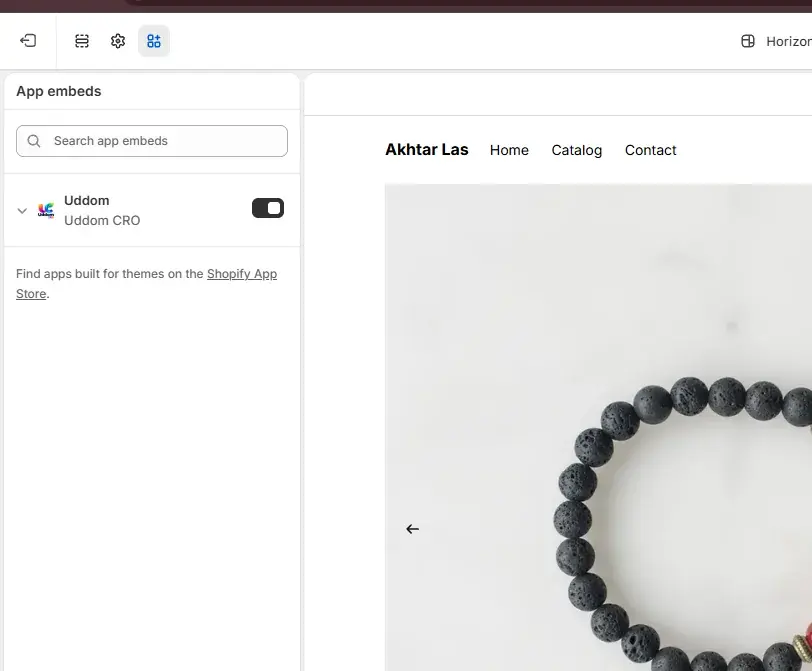
Install Uddom, enable the app embed, and switch on your first free module.