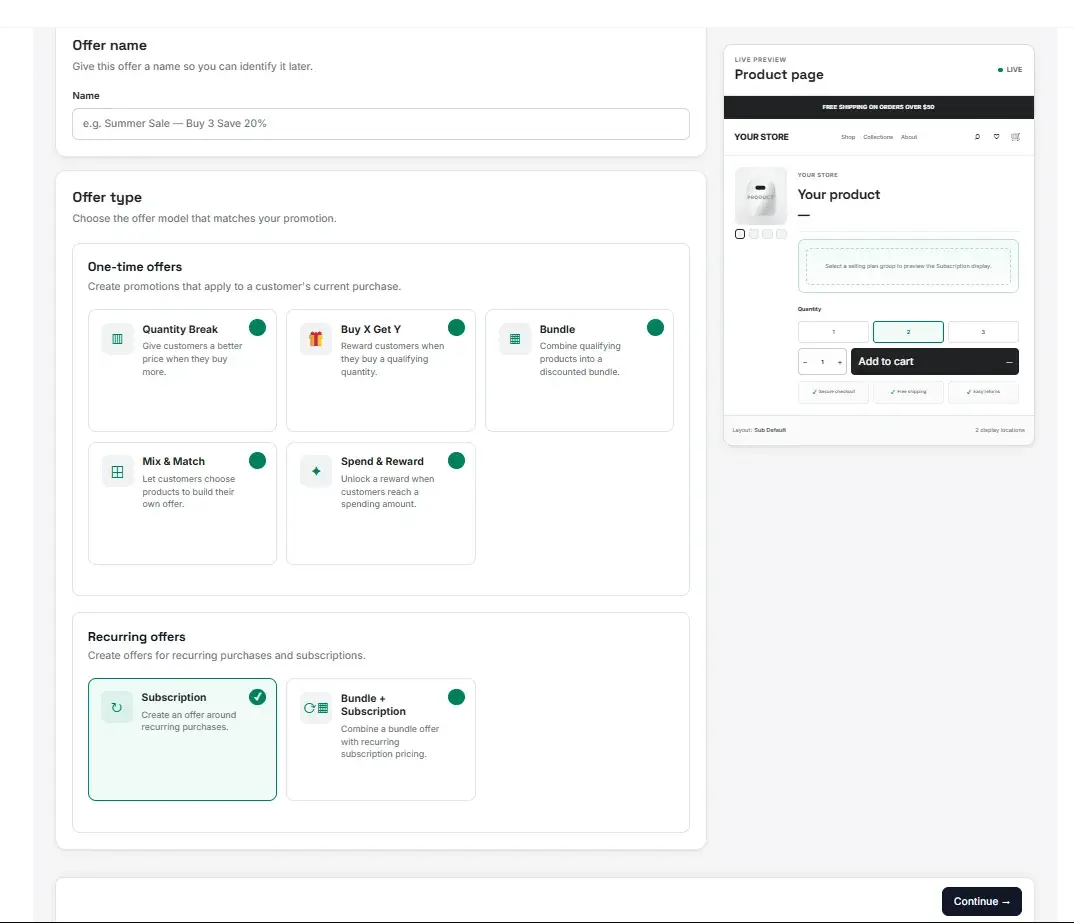
Quantity Break
Give customers a better price when they buy more.

Uddom builds automatic discounts that apply at checkout — volume breaks, bundles, Mix & Match, spend & reward and free gifts — so you never depend on the shopper finding a code.
Pick the model that matches the behaviour you want, then set the tiers, products and reward inside the app.
Give customers a better price when they buy more.
Reward customers when they buy a qualifying quantity.
Combine qualifying products into a discounted bundle.
Let customers choose products to build their own offer.
Unlock a reward when customers reach a spending amount.
Create an offer around recurring purchases.
Combine a bundle offer with recurring subscription pricing.
Choosing the model is the first step in the offer builder. Everything after it — the products, the rules and the reward — hangs off that choice, and you can leave an offer as a draft until it is ready.
Each offer takes one reward type. The same five are available whichever model you start from.
Reduce the eligible price by a percentage.
Take a fixed amount off the eligible purchase.
Set a fixed price for the eligible purchase.
Give the customer one or more qualifying products.
Remove the eligible shipping cost.
An offer moves through draft, active, scheduled, paused, expired states, so you can build it as a draft and schedule it to start and end when you want.
The discount is applied by a Shopify Function at checkout, so the shopper gets the right price on the order itself — whatever theme or cart they use. Uddom creates and keeps the discount in step with the offer you configured.
The full builder walkthrough is in the user documentation.
Offers are part of the Convert plan. Build one in the app and it starts applying at checkout.